Aller au contenuSkip to content

SentinelleDocs · FOR ALL TRADES

Document management: all your business documents, monitored before they expire

Document management: your permits, insurance, training and contracts each have a date. SentinelleDocs keeps them together and notifies the right person before that date passes.

SentinelleDocs is the document management software from Groupe Sentinelle, a Quebec publisher. It can be used in a browser, on a computer or on a phone, without installation.

A carrier, a plumber, a bakery that delivers, an HR department: the files are the same. Business, vehicles, drivers, employees. Only the list of mandatory documents changes from one profession to another.

  • Free 7-day trial, no credit card required.

  • Cancel anytime.

  • Reminders by email and in the app before each deadline.

Try free for 7 days

Plans, trial and terms recorded on this page on November 16, 2026. The terms displayed in the app take precedence.

Document management: what the software monitors for you

Storage alone is not enough. What matters is what the tool does before a document expires. Four mechanisms do that work, each addressing a practical situation.

A reminder before expiration, sent to the right person

Track four types of documents: permits, insurance, training and contracts. The exact list depends on your industry and your answers when signing up.

Reminders arrive by email and in the app 30, 15 and 7 days before expiry, and on the expiry date. A summary arrives every Monday to help you plan the week.

Only the person responsible for renewal is notified: the vehicle manager for registration, HR for training, or the owner for business insurance. Other team members avoid unnecessary emails.

Schedule and channels described on the product page, recorded on November 16, 2026. The settings in the app take precedence.
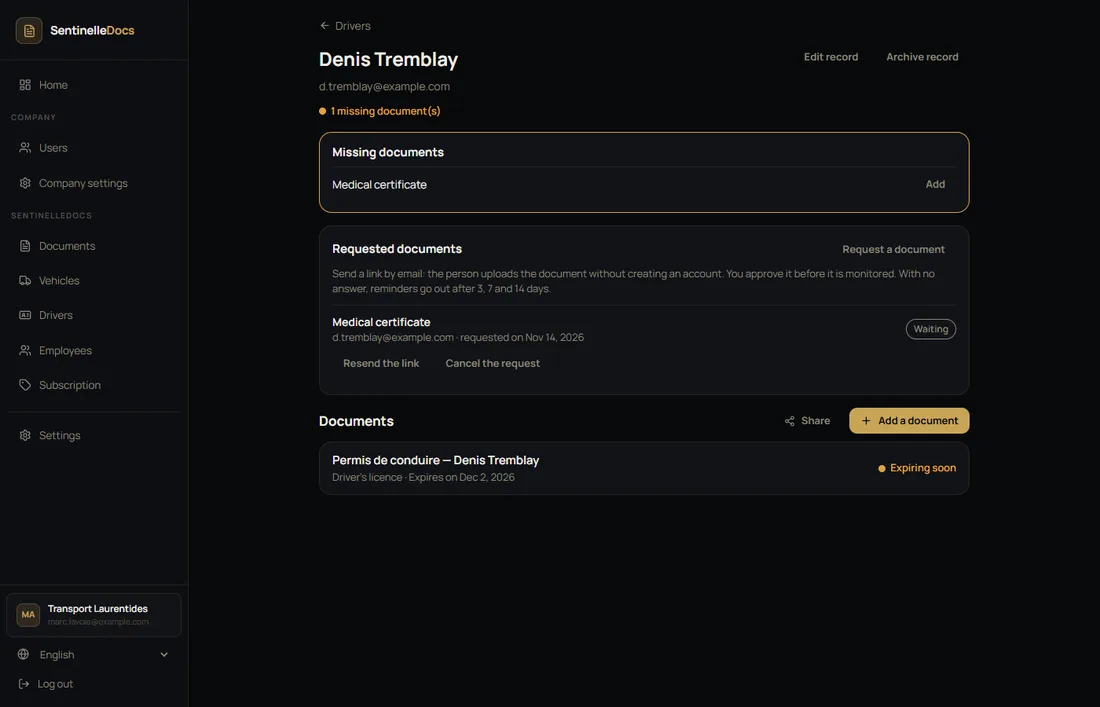
Request missing documents by link

Some documents are still missing from your records: a new employee’s trade certificate, a driver’s medical certificate or a subcontractor’s attestation.

Send a link. The employee uploads a photo without creating an account. You approve or reject it, and the document is added to their record. If there is no response, follow-up reminders are sent after 3, 7 and 14 days.

Entirely fictional illustration - Canada / CAD: a company tracking 4 vehicles and 6 drivers has around twelve vehicle documents and twelve driver documents. These figures are not from any customer and do not represent an average.

Employee and vehicle records

Each employee, vehicle and driver has a record. Select the documents required for your business; a record with a missing document is marked “incomplete”. You can spot missing documents before an inspection.

Documents reflect your industry: contracts, identity documents, diplomas and reviews for employees; registrations, insurance and inspections for vehicles.

Employee files remain confidential: only the owner, administrators and HR see them. The rest of the team views the vehicles without accessing personnel files.

Driver record: missing document, pending request and a licence expiring soon
Real screenshot with demo data: a record and the documents still needed.

Sharing files with controlled access

An insurer, an inspector or a customer requests a document. You share a read-only link, valid for 1 to 30 days, revocable with one click. The link provides access to the document, not your library.

Roles separate access for owners, administrators, vehicle managers, HR and read-only users. Two-factor authentication can be required for the whole team. Each company’s data is kept separate, download links expire after 60 seconds and the audit log records actions.

These details describe the features advertised on this page as of November 16, 2026. Check their availability in the app before subscribing.

For example, a client requests a vehicle’s insurance document. You send a link valid for 7 days. They download that document, and the link then expires. The rest of your documents stay private.

Get started with document management in four steps

No IT project or server to install. Four steps, and the tool is ready to use.

1. Create your account

Two minutes, no credit card. Choose your industry and answer three questions: vehicles, drivers, employees.

The menu shows only what you need. A business without vehicles will not see a vehicles tab, and a two-person team will not see user management.

The stated time comes from the product page, recorded on November 16, 2026. It depends on your connection and the information you have ready.

2. Add your documents

Upload your existing files, several at a time. Each file becomes a document with its category, record and expiry date.

The app reads the expiry date from the PDF, photo or scan and suggests it on screen. You verify it: your confirmation takes precedence over the automatic reading.

Request missing documents from your employees by link as soon as you get started. Begin with the files you already have.

3. Try it for 7 days

Everything is included during the trial: tracking dates, reminders, document requests, sharing, export. A banner in the app indicates the remaining days.

The trial starts when your account is created, with no credit card. Under the terms shown today, it lasts seven days. Seven days is not enough to understand an organisation, but it is enough to see whether the tool can keep track of your documents.

4. Choose your plan

In the app, open “Subscription”: choose a plan, monthly or yearly billing, and pay by card through Stripe. We never see your card number.

Without a plan, access closes. You can no longer view your documents and reminders stop. If you pay within 30 days, everything returns. After 30 days without payment, the company and its documents are deleted; an email warns you 7 days beforehand.

Every deadline at a glance

Track expiry dates in a list sorted by date. See three statuses: valid, expiring soon and expired. This helps you track document compliance; it is a current view of required documents, rather than a certification.

When reminders are sent

When What happens
30 days before due date First email and first expiration alert in the app
15 days before Second reminder
7 days before Third reminder
On the expiry date Reminder on the expiry date
Every Monday Weekly summary of upcoming deadlines

Schedule shown on the product page, recorded on November 16, 2026. Settings, channels and timing may change; the app takes precedence.

What the library shows

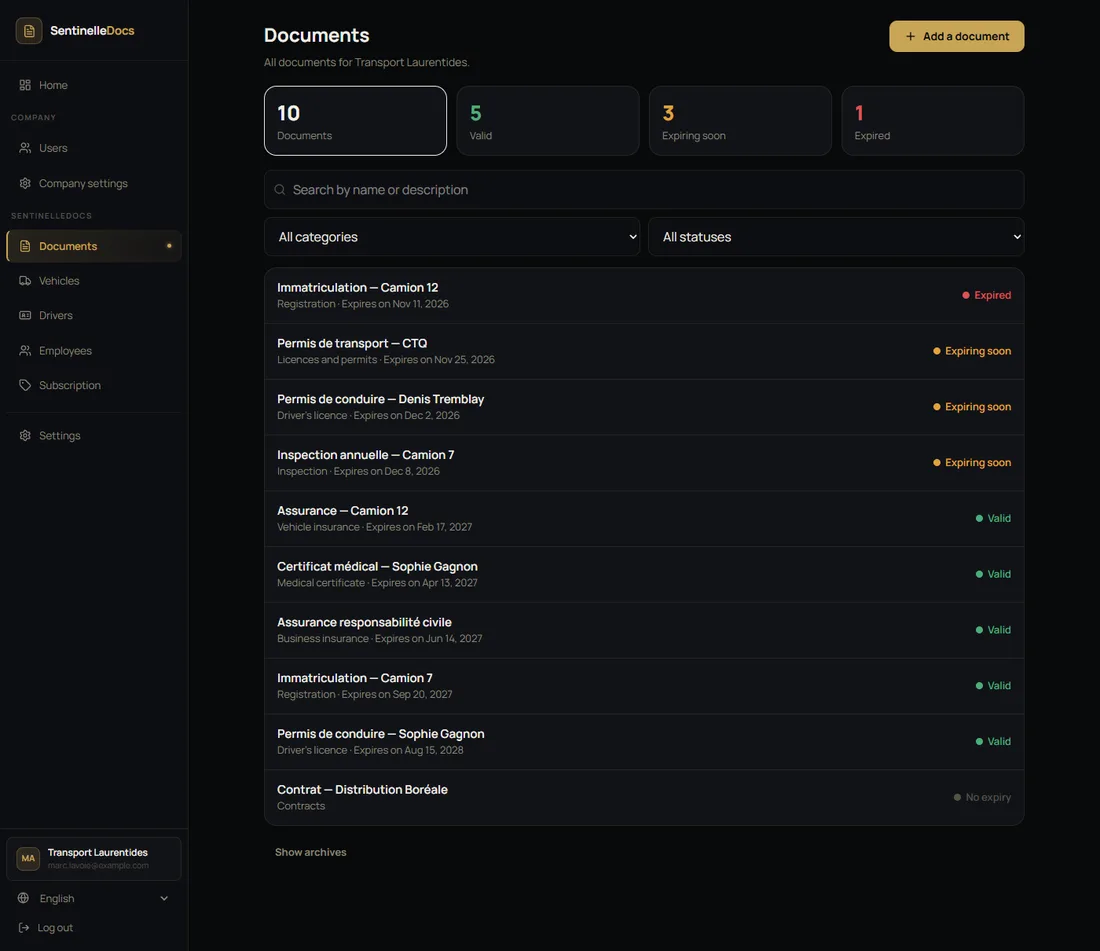
The library shows each document with its date and status. Search, filter and archive your documents, and keep their version history, additions, requests and renewals together.

A document replaced by a more recent version does not disappear. The old one remains viewable in the history, with its date.

Sort by expiry date rather than date added: documents nearing expiry appear at the top, without opening every record. An empty record is also easy to spot, and that is often where omissions begin.

SentinelleDocs library with search, filters and document statuses
Real screenshot with demo data: document dates and statuses in the library.

What each role sees

The owner sees everything. HR sees personnel files. The vehicle manager sees the vehicles and their drivers. A read-only account views without editing.

This separation applies on screen and to shared links: a sharing link opens a document, not the entire record. A renewal reminder sent to the wrong person may mean an ignored email; opening an HR record to the whole team has different consequences.

Comparison

Best document management software 2026

Pro: 750 documents for USD 99/month, 25% more capacity than Expiration Reminder Professional.

Best document management software 2026
  • SentinelleDocs Pro: 99 USD per month; 750 documents; 10 users
  • Expiration Reminder Professional: 99 USD per month; 600 tracked items; Unlimited admin users
  • Remindax Professional: 79 USD per month; 700 tracked items; 2 users

Monthly plans compared in USD. Documents and tracked items follow each provider’s limits. Offers may change.

Checked on November 17, 2026 · Sources : Expiration Reminder · Remindax

Three plans, all features included

Plans differ only in the number of users and documents. Every plan includes all features. No extras to add later.

Currency
Billing

All features included

Essential - getting started

55 CAD

per month

3 users · 150 documents

For a small team tracking a few vehicles and an initial group of employees.

Try free for 7 days

All features included

Pro - most popular

139 CAD

per month

10 users · 750 documents

For a business adding drivers, subcontractors or several categories of training.

Try free for 7 days

All features included

Enterprise - large teams

279 CAD

per month

Unlimited users · 3,000 documents

For organisations bringing together several sites, trades or a large fleet, with separate roles.

Try free for 7 days

What all three plans include

  • Company, vehicle, driver and employee documents.

  • Email and in-app reminders, with a Monday summary.

  • Document requests by link, with follow-up reminders.

  • Automatic expiry-date reading, for you to verify.

  • Read-only sharing, for 1 to 30 days.

  • Two-factor authentication.

  • Full export and permanent deletion.

  • Six languages: French, English, German, Italian, Spanish, Portuguese.

Payment, currency and trial

Pay by card on the “Subscription” page, monthly or yearly. The yearly option offers a 15% discount.

Your currency depends on your company’s country: Canadian dollars in Canada, euros in Europe and US dollars elsewhere. Taxes extra. The page currently lists an entry price of CA$55 per month in Canada, recorded on November 16, 2026.

Fictional reference - Canada / CAD: this entry price is before taxes, for a monthly subscription, and is neither an average nor a contractual rate. It may change without notice.

The 7-day trial requires no credit card. The exact amount in your currency is shown in the app before any payment.

Entirely fictional example - Canada / CAD: a team of 8 people tracking 5 vehicles and 40 employees fits within the Pro plan limits of 10 users and 750 documents. These figures do not describe any customer and are not a recommendation.

Your document management questions, answered

How do I pay?

After your trial, open “Subscription” in the app, choose a plan, monthly or annual, and pay by card. Payment goes through Stripe: we never see your card number.

What currency am I billed in?

Based on your company’s country: Canadian dollars in Canada, euros in Europe, US dollars elsewhere. Taxes extra.

What happens after the 7-day trial?

Choose a plan and pay by card to continue. Without payment, access to SentinelleDocs closes: your documents are no longer visible and reminders stop. If you pay within 30 days, everything returns. After 30 days without payment, the company and its documents are permanently deleted; an email warns you 7 days beforehand.

I don’t have vehicles. Is this for me?

Yes. When signing up, tell us whether you have vehicles, drivers and employees. The menu shows only the sections you need. A service business can use SentinelleDocs just for contracts, insurance and training.

Are my documents safe?

Each company sees only its own documents. HR records are visible only to the owner, administrators and HR, and two-factor authentication is available. These details describe the offer on this page as of November 16, 2026; full terms are available in the app.

Can I cancel and take my data with me?

Yes, at any time. Export everything in one ZIP file and permanently delete your company from Settings if you wish. Cancelling stops reminders, not access to your own files.

Get started today

Create your account in two minutes: a 7-day trial, no credit card, nothing to install. Add three documents and see what the library shows.

A question before getting started? Fifteen minutes with us is enough to get a clear answer for your situation.

Try free for 7 days · Book a demo · admin@groupesentinelle.ca